What if welcoming a guest did not mean handing over control of your home? With smart home features in luxury new builds UK, the difference between temporary access and household permissions matters. A visitor may need a way in, but that does not mean they need to adjust connected devices or keep access after their stay.
Smart locks, apps and connected systems can make arrivals more convenient, but permissions need to be clear, limited and easy to review. The aim is to give guests what they need without giving them more access than their visit requires.
This guide explains how guest access differs from household access, how to set appropriate permissions and how to review or revoke them. It also covers how locks, apps and other devices may work together, and what to consider when assessing a luxury new build. Technology is one part of a home’s wider design. Thoughtful planning can help it support everyday life while respecting privacy and peace of mind.
Key Takeaways
- Decide what a visitor needs before granting access, and keep guest permissions separate from those of residents and trusted household members.
- Check how each device handles user access, time limits and account management. Controls can vary between systems.
- Compare shared credentials with individually assigned access, considering convenience, control and accountability.
- Use a consistent routine: grant the minimum access needed, set an end point where possible, then review and revoke permissions after the visit.
- When assessing smart home features in luxury new builds UK, include access, privacy, compatibility and future household needs in the wider technology brief.
Smart home features in luxury new builds: why guest access needs its own plan
A connected home can make everyday routines more convenient, bringing lighting, climate, entertainment and security controls within easier reach. Home automation, also known as smart home technology, encompasses systems that monitor and control home attributes such as lighting, climate, entertainment, and security. But convenience depends on knowing who can use which functions. A guest may need a straightforward way inside, not the same level of control as a resident.
That distinction is central to smart home features in luxury new builds UK. Guest access means deliberately giving a person permission to use selected functions, potentially for a defined period. It is not automatically the same as sharing a household account, handing over a control device or providing entry through a smart lock. Each approach gives a different kind of access and has different implications for privacy and oversight.
What does guest access mean in a smart home?
Imagine a friend arriving while the household is away. They may need permission to enter, but that need not give them access to camera feeds, household routines, device settings or personal account information. Entry permission applies to a door. Shared control applies to particular devices or functions. An account may expose a wider range of household controls and data. These forms of access should not be treated as interchangeable.
The options depend on the devices and system in use. Some systems let a household create a separate user or restrict access to selected functions; others offer fewer distinctions. The practical questions are what the permission lets a guest see or change, which devices it covers, and when it should end.
Why does a luxury new build need clear access boundaries?
Clear boundaries support privacy as well as a smooth welcome. A visitor can receive the access needed for a particular purpose without being treated like a resident. This helps keep household settings, routines and connected-device information under the household’s control, without giving every guest the same credentials.
A polished experience does not come from technology alone. It also depends on understanding who has access, what each person can do and whether that permission is still appropriate. A household might give a visitor entry for a single stay, while a trusted person who visits regularly may need a different arrangement. Permission should reflect the relationship and the task, rather than being copied from one user to another.
Luxury new builds do not all contain identical smart-home systems, and access options vary. Considering guest permissions as part of the home’s wider technology specification helps buyers look beyond the visible controls. The aim is considered convenience: technology that suits the household, with clear boundaries around who can enter, operate devices or view household information.
How smart-home permissions work: access levels, time limits and accountability
A useful way to organise smart-home access is to consider three groups: residents, trusted household members and temporary visitors. Residents usually manage the main household settings and accounts. A trusted person may need selected access for regular responsibilities, while a visitor may need a narrow permission for a limited period. These are planning categories, not standard roles available on every system.
Least-privilege access means giving each person only the permissions they need for a specific task, and no more. A system may let you limit permissions by device, action or duration. For example, a guest might be able to unlock an entrance without changing security settings or managing other users. The available controls depend on the device and platform.
Which permissions might a guest actually need?
Start with the reason for the visit. Someone collecting a parcel may need a way to enter, while a visitor using a shared living space may need access to a relevant control. Neither situation automatically calls for administrative authority over the wider smart-home system. Identify the function required, then grant only that level of access if the system supports it.
Locks, alarms and connected platforms differ. One may distinguish between entry and system management, while another may offer fewer permission choices. Do not assume that access to one function creates a boundary around all the others. Before granting access, understand what it enables, including whether it reaches other devices, settings or account information.
How do time limits and named accounts improve oversight?
Where supported, assigning access to an identifiable guest is generally easier to manage than sharing a resident’s credentials. A separate user can make it clearer who has permission while keeping the household’s sign-in details private. Shared credentials can blur that distinction: access may be difficult to attribute, and changing the details could affect other household members who use them.
For temporary access, set an end point if the system allows it. Match the limit to the visit rather than leaving permission open indefinitely. If the system does not offer time-limited access, make a note to review and remove the permission when it is no longer needed. A setting is not temporary simply because the visit was.
A brief review can keep access arrangements accurate. Check who currently has permission, what each person can use and whether that access is still appropriate. Revoke or adjust permissions that are no longer required, using the controls available in the relevant account or device. This is a practical part of assessing smart home features in luxury new builds UK: a system should suit the household over time, not just at the point of setup.
As you consider a home’s wider specification, explore Pimlico Homes’ luxury new-build homes with the same attention to thoughtful design and everyday living.
Smart home security in luxury new builds: balancing convenience, privacy and compatibility
Connected systems can make a home more convenient, but ease of access is only one part of a considered setup. Households should also consider who can view information, change settings or manage other users. A permission that feels straightforward for a resident may reveal more than intended when shared with a visitor.
Compatibility means devices can work together; meaningful permission control means people can be given appropriately limited access to them. One does not guarantee the other. Even when devices connect within a broader system, their account structures and permission controls may differ.
Shared access or individual permissions: what is the difference?
Both approaches can be convenient, but they offer different levels of oversight. The options depend on the access controls available in the chosen system.
Ease: Shared credentials can be quick to pass on. Individually assigned access may take more setup, but gives each person a separate identity where supported.
Oversight: With shared credentials, it can be harder to tell who used the account. Individual access can make permissions easier to associate with a person, depending on the system’s records and controls.
Removing access: Ending shared access may mean changing credentials and updating other users. A separate permission may be easier to remove on its own, if the system allows it.
Sharing a resident’s login also gives a visitor the same account identity, making activity and responsibility harder to distinguish. If individual access is available, it is often a more considered option for someone who needs temporary or ongoing use. Where it is not, weigh the convenience of sharing against the wider access it may permit, and decide in advance how that access will end.
How should privacy and connected platforms shape the decision?
Matter, Apple Home, Google Home and Amazon Alexa are distinct ecosystem entities, not interchangeable labels for one universal access model. Device compatibility, account arrangements and permission detail can vary between these platforms and the devices connected to them. A product’s ability to connect with an ecosystem does not, by itself, show what a guest can see or control.
Before granting access, consider the information and functions it exposes. Could a guest see camera views, household routines or device names? Could they change settings, add users or reach controls beyond the purpose of the visit? The answers depend on the system, so review permissions for each relevant account and device rather than assuming one setting governs everything.
For buyers considering smart home features in luxury new builds UK, these distinctions belong alongside convenience and compatibility in the wider technology assessment. A coherent system is useful, but the household’s ability to manage visibility and access matters just as much to its day-to-day experience.
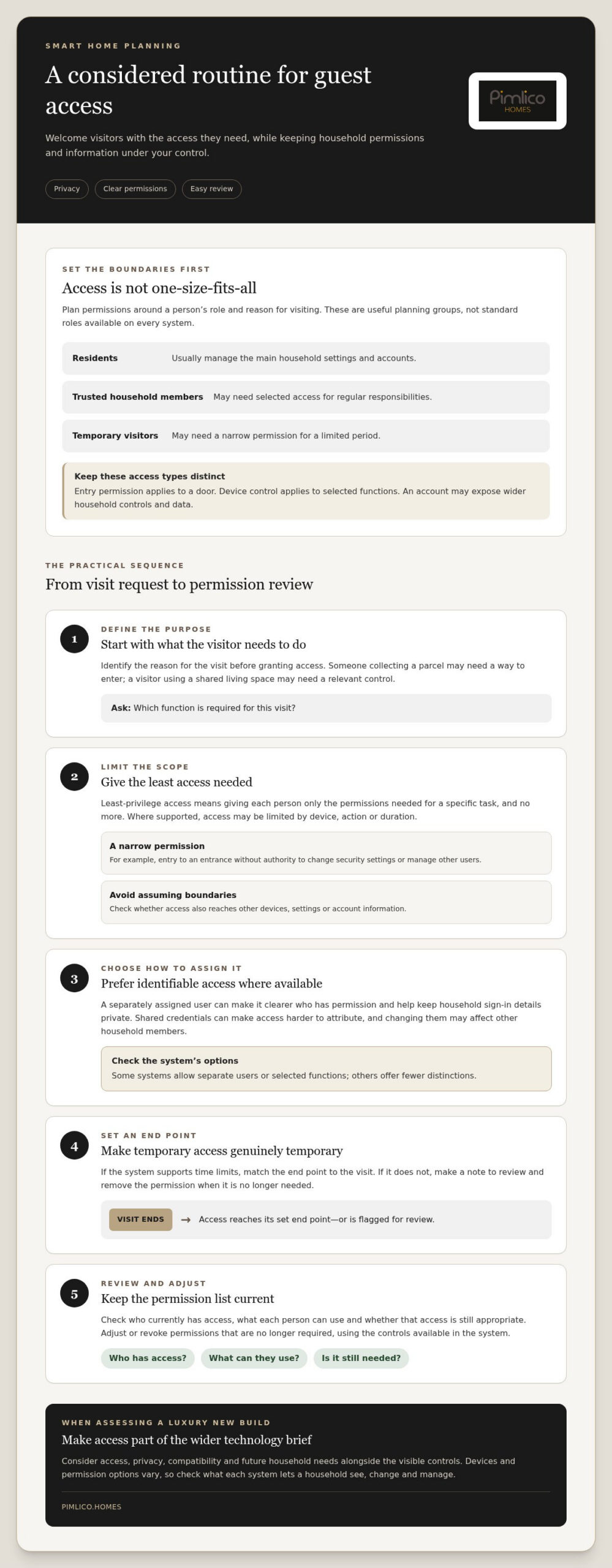
How to manage guest access securely: a practical setup and review routine
A reliable access routine should be simple enough to repeat. Start with the purpose of the visit, grant only what is needed, decide when the permission should end and review the arrangement afterwards. Controls and labels differ between systems, so follow the instructions for the relevant device or account rather than assuming every smart lock or platform works the same way.
- Identify the need. Decide which entrance, shared space, device or action the person needs. A visitor collecting an item may need entry only, not access to cameras or household settings.
- Grant the minimum access. If supported, use a separate guest identity or credential. Choose the narrowest available permission rather than sharing a resident’s account by default.
- Set an end point. Use an expiry time or date if the system offers one. If it does not, note when the arrangement should be reviewed and ended.
- Review the arrangement. Once the visit or task is over, check active users and credentials. Remove or amend permissions that are no longer needed.
How do you grant a guest only the access they need?
Think about the practical task before opening the app. For a weekend guest, this could mean entry for the agreed stay without access to household settings. Where separate identities and limits are available, use them. If the system offers fewer controls, read its instructions to understand what a shared permission allows before granting it.
For example, a friend staying for a short visit might need entry during that period. Someone who regularly helps with household tasks may need recurring access, but only to the relevant entrance or function. The right setup depends on the system, so do not treat recurring access as a reason to share full administrative control.
What should you review after a guest’s access ends?
Check the access list for temporary users, credentials and any shared account details. Remove or change permissions that no longer serve a purpose. If a resident’s credentials were shared, update them and make sure other household members who need access can still use the system. Then review the list periodically, rather than only after a visitor leaves.
For smart home features in luxury new builds UK, this routine makes access management a considered part of everyday ownership. Keep a simple note of who has access and why, particularly when permissions recur. A brief review can reveal old arrangements that are easy to overlook, while the device instructions help you use the controls as intended.
As you assess a home’s wider design and specification, explore luxury new-build homes with everyday living and thoughtful planning in mind.
Planning smart-home features in a luxury new build: make access part of the brief
A smart-home specification is about more than which devices connect or what an app can control. Consider how residents and visitors will use the system, how permissions can be managed and whether the arrangements will still make sense as household needs change. For buyers considering smart home features in luxury new builds UK, guest access is a practical part of the wider conversation about privacy, convenience and long-term living.
As you assess a property, consider how its technology fits alongside the architecture and everyday routines. A well-planned arrangement should feel intuitive, rather than adding complexity to the welcome you want your home to offer. Details depend on the system, so focus on how access is organised and understood instead of assuming every new build includes the same capabilities.
What should buyers consider in a new-build smart-home specification?
Use this checklist to assess access and usability:
- Different users: Consider how residents, trusted household members and visitors could have distinct access, where the system supports separate permissions.
- Clear controls: Think about whether household members with different levels of technical confidence can understand the system and manage access.
- Privacy boundaries: Consider what a guest might be able to view or change, including connected devices, settings or household information.
- Compatibility: Look at how relevant devices and accounts work together, and whether access controls are consistent across them.
- Changing needs: Consider how permissions could be reviewed if household routines change, a visitor arrangement ends or devices are replaced.
These questions bring guest access into the technology brief early, rather than leaving it as an afterthought. They also help clarify a system’s practical limits. For example, compatible devices do not necessarily allow a household to create separate guest permissions for each one. Find out what the system allows and how its controls are managed.
How can access planning support a considered luxury-home experience?
In a thoughtfully designed home, technology should support the way people live without demanding constant attention. Clear access arrangements can contribute to that sense of ease: household members understand how permissions are handled, and visitors can be welcomed without automatically receiving the same level of control as residents. The details matter, even when they remain discreet.
For further context on assessing a property’s wider specification and purchase considerations, explore Pimlico Homes’ luxury new-build home buying guide. Pimlico Homes develops luxury residential properties, including luxury new-build homes, executive courtyard homes, bespoke homes and premium barn conversions. Technology decisions sit alongside the wider design choices that shape the experience of living in a home.
Explore Pimlico Homes to discover its luxury residential developments.
Make thoughtful technology part of your next home decision
Consider guest access while forming a picture of life in a home. Think about how you welcome visitors, what privacy means to your household and how comfortable everyone feels managing connected systems. These priorities help you assess smart home features in luxury new builds UK as part of the overall living experience, not simply as a collection of devices.
When considering a purchase, look beyond the immediate appeal of technology. Ask whether the home’s wider design and specification can support the way you expect to live over time. Pimlico Homes develops luxury residential properties, with a focus on design and the experience of living in them.
Take the next step and explore Pimlico Homes’ luxury new-build homes. A clear sense of what matters to your household can help you move towards a home that feels welcoming and thoughtfully considered.
Frequently Asked Questions
Is guest access to a smart home secure?
Guest access can be managed securely, but no permission setup removes every risk. Security depends on the devices, account settings and how credentials are handled. Use a distinct access method where available, avoid sending credentials through public or shared channels, and remove access when it is no longer needed. If a device or account behaves unexpectedly, review its active users and follow the manufacturer’s guidance for securing it.
Can guests use a smart lock without downloading an app?
Sometimes, but it depends on the lock and the access method configured by the household. Some systems support an access code or another entry method, while others rely on an app or shared control device. Check the lock’s instructions before arranging a visit, particularly if the guest cannot install an app. Do not assume every smart lock offers the same alternatives.
How do I remove a guest’s access to a smart home?
Use the relevant app, account or device settings to find and remove or disable the guest’s access, following the system’s instructions. Then check whether the person also had a separate entry code, another account invitation or access through a shared household login. If shared credentials were used, changing them may be appropriate. Confirm that household members who still need access can use the updated arrangement.
Can smart-home guests have different permissions from residents?
Yes, if the system supports separate user roles or permissions. A guest might be allowed to use a particular function without changing broader settings, but the available distinctions vary by device and platform. For instance, a household may want a visitor to use a shared room’s controls without exposing account management. Review the system’s permission descriptions so the intended level of access is clear.
Do smart-home guest permissions work without an internet connection?
It depends on how the specific lock or device handles access. Some functions may rely on a local connection, while remote management or app-based features may require internet access. Do not assume a guest’s permission will work during a broadband outage. Check the device instructions for offline behaviour and consider what practical alternative the household would use if connected access is temporarily unavailable.
What smart-home information can guests see?
Guests may see only the function they have been given access to, or more information if they use a shared account. The result depends on the system. Consider whether an invitation exposes device names, routines, camera views or household activity. Before granting access, review the screens and controls associated with that user type. A separate account, where supported, can help keep a visitor’s view distinct from a resident’s.
Are smart-home features standard in UK luxury new builds?
No single set of smart-home features should be assumed across all UK luxury new builds. Technology and specifications can differ between homes, and connected devices do not necessarily mean guest permissions are included or configured in a particular way. When assessing a home, consider how its technology supports your household’s needs, how it is managed and whether access arrangements are clear to the people who will use it.